Sun Tracker Apps
Best Sun Tracker Apps for iPhone in 2026, Based on Written Reviews
By SunCast team · Published · Last updated · 14 min read · Markdown

TL;DR: SunCast is our pick for most iPhone and iPad users planning sunlight at a real place. You can scout in Street View, check the sun path in live AR and see building and terrain shadows on the map. Free quotas cover almost all paid features, and its 4.73/5 average from 15 written reviews was the highest in our six-app sample.
A sunset time will not tell you whether a building shades your balcony or where to stand for a photograph. For those questions, you need to see the sun at a particular place and time, along with the shadows around it.
We compared six apps and analysed 144 written App Store reviews dated from 20 January 2026, collected across 30 selected storefronts. Our recommendations depend on what you need to plan:
- SunCast is the best overall choice for sunlight and shadow planning, from remote scouting to AR on site.
- Sun Surveyor suits photographers who also plan moon and Milky Way shots.
- Sunlitt has the broadest Apple device support, including Mac, Apple Watch and Vision Pro.
SunCast’s free quotas may cover a one-off task. If you only need sunrise, sunset or the sun’s basic direction, start with our free sun calculator.
What makes a good sun tracker app?
A long feature list tells you little about how easily you can answer a question at your chosen location. We looked at four things:
- Location and shadows. A sun path gives direction, but building and terrain shadows show why a place may be shaded while the sun is up. You also need a reliable way to select places you have not visited.
- Useful AR and clear controls. Seeing the sun path over the scene is central to these apps. The map, location picker and time controls should make that view easy to plan and use. Reviews praise depth when it helps and complain when basic settings are hard to find.
- Fit for the task. A daylight shoot, a Milky Way photograph, a garden plan and a quick Watch check call for different tools.
- Friction. Crashes, difficult searches and payment prompts matter when they interrupt a task. Written reviews show where that happens and what the user was trying to do.
The averages below come from the written reviews we collected. The recommendations are our editorial judgement, informed by those reviews and by what each app does. For closer feature comparisons, see our comparison library.
Best sun tracker apps at a glance
The scores below come from written reviews updated from 20 January to 18 September 2026. They are different from Apple’s headline ratings. Each score includes its sample size.
| App | Reviews | Rating / 5 | Negative¹ | Why choose it? |
|---|---|---|---|---|
| SunCast | 15 | 4.73 | 1/15, 6.7% | Live AR, Street View scouting and mapped building and terrain shadows |
| Sun Surveyor | 17 | 4.59 | 1/17, 5.9% | Sun, moon and Milky Way planning for photographers |
| Sun Seeker | 52 | 4.50 | 5/52, 9.6% | A focused solar compass, AR view and established professional following |
| Sun Tracker AR | 21 | 3.90 | 5/21, 23.8% | Solar reference, AR and eclipse tools |
| Sunlitt | 22 | 3.86 | 7/22, 31.8% | Visual design and broad Apple-device support |
| Sun Quest | 17 | 2.24 | 11/17, 64.7% | Weather context alongside sun-path and shadow planning |
¹ Negative reviews are rated one or two stars; counts and percentages refer to the written reviews analysed.
SunCast had the highest average, 4.73/5 from 15 reviews. Sun Surveyor scored 4.59/5 from 17. Sun Seeker had the largest sample, with 52 reviews. We queried 30 storefronts for each app; 27 yielded reviews within the selected dates. Study calculations
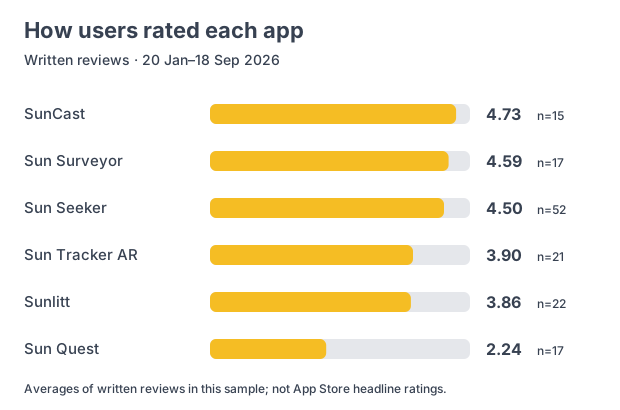
Source: Apple public written-review feeds; SunCast team analysis, collected 18 September 2026. Each review has equal weight. Full methodology and rating distributions appear below.
The written feedback gives the scores context. Sun Quest reviewers often object to payment prompts, while Sunlitt reviewers report reliability problems. Even satisfied Sun Seeker users ask for better ways to export their work.
 1. SunCast: best overall for sunlight planning
Written-review average: 4.73/5 · 15 reviews.
SunCast is our pick for photographers, home buyers and gardeners who need to understand light at a specific place. Scout the sun path from ground level in Street View, check building and terrain shadows on the map, then hold up your phone to see the path in live AR. On supported iPhones, the AR view also offers a 0.5× ultrawide lens and the front camera.
Cloud forecasts help you choose a day, and Construction Mode lets you test how a proposed structure would change the shade.
What users like
Reviewers describe using SunCast for photography, garden solar panels, property checks and choosing spots for plants. They also praise how quickly they can get an answer.
One photographer says SunCast helped plan the light for a gig without a complicated setup. Review
Another reviewer used it to plan solar panels in a garden and praised its straightforward access. Review
Almost all paid features have free, limited-use quotas. An occasional user may be able to finish a one-off plan without paying; regular users can try the workflow before subscribing.
Where users want improvements
One reviewer wants manual time-zone control near US state borders. Another reported an inaccurate solar-panel shading assessment. A later review praises the app for planning garden solar panels, though that does not resolve the earlier complaint. Time-zone feedback, earlier solar-panel feedback, later solar-panel praise
Our verdict
Choose SunCast for daylight photography, property viewings and gardens when you need to plan remotely and then check the scene in AR. Street View, mapped shadows and cloud forecasts give that on-site view more context. It had the highest average in this written-review sample, and the free quotas make it practical for occasional use.
If your shoots involve the moon or Milky Way, Sun Surveyor is a better fit. Sunlitt is the stronger choice when Mac or Apple Watch support matters most.
 2. Sun Surveyor: best for sun, moon and Milky Way photography
Written-review average: 4.59/5 · 17 reviews.
Sun Surveyor is for photographers planning celestial subjects as well as daylight. Its AR views cover the sun, moon and Milky Way, alongside an interactive map, Street View, a 3D compass and photography opportunities. You can plan a sunset shoot and carry on into the night with the same app.
What users like
Reviewers use Sun Surveyor for landscapes, film shoots, eclipses, solar installations and picking a campsite. Several have relied on it for years. Review evidence One long-time user calls it essential for landscape photography. Review
Where users want improvements
The controls frustrate some users. One could not find a way to enter their current location, while another found the toolbar icons unclear. Location review, interface feedback Others ask for larger text and another map provider where the current one has limited coverage. Readability feedback, map-provider request
Our verdict
Choose Sun Surveyor when one trip involves daylight, moonrise and the Milky Way. Its range of planning views and positive feedback from long-time users make it a strong photography choice. For property or garden work that depends on mapped building and terrain shadows, choose SunCast.
 3. Sun Seeker
Sun Seeker is a solar compass and AR sun-path tool for planning on location.
Written-review average: 4.50/5 · 52 reviews.
Sun Seeker shows solar direction, seasonal paths and solar events in compass, map and AR views. You can change the date and location, and there is an Apple Watch app.
What users like
Sun Seeker has the largest sample in our study. Reviewers describe using it for exterior shoots, architecture, solar panels and home buying. Several have used it for years. Review evidence One cinematographer praises it for planning exterior shots. Review
Where users want improvements
Some reviewers struggle to read the display, switch locations or select a future date. Others report sun-path alignment problems. Each can disrupt a site visit or a shoot. Interface feedback, location switching
Professional users ask for PDF exports they can use in CAD drawings, plus snapshots labelled with the date, time and location. Those details would help when sharing a plan with a client. PDF export, annotated snapshots
Our verdict
Sun Seeker still makes sense if you rely on its compass view, Apple Watch app or solar notifications. For a new iPhone choice, we recommend SunCast. Both show the sun path in AR, but SunCast also lets you scout the view in Street View and check mapped building and terrain shadows and cloud cover before you arrive. Sun Seeker’s requests for easier location switching and more useful exports matter when a shoot or client visit depends on the plan.
 4. Sun Tracker AR
Sun Tracker AR pairs AR sun paths with detailed solar information and eclipse tools.
Written-review average: 3.90/5 · 21 reviews.
Sun Tracker AR has AR sun paths, solar-event information, shadow simulation and eclipse tools. It suits people who want both a visual path and the underlying solar details.
What users like
Reviewers use it to check sunlight around home solar panels and property shade, or to explore eclipses. The AR view can show the sun’s path from inside a home; the solar details go beyond sunrise and sunset times. Review evidence
Where users want improvements
Remote shoots are harder to plan when a location has no searchable name or nearby landmark. One photographer had to pan and zoom around the map to find a place missing from search. Review
Other reviewers want the iPhone’s 0.5× camera restored and golden- and blue-hour information easier to find. Camera request, solar-event feedback
Our verdict
Choose Sun Tracker AR for solar reference, eclipse planning and viewing the sun’s path in AR. Its remote location picker may slow down photographers scouting places without a searchable name. SunCast adds Street View scouting and mapped building and terrain shadows, and its Construction Mode gives you more room to test proposed structures. Its 0.5× AR option on supported iPhones also answers a camera request in the reviews above.
 5. Sunlitt: best across Apple devices
Written-review average: 3.86/5 · 22 reviews.
Sunlitt is for people who like a visual approach and want sun information on more than their phone. It has AR, Shadow Map, landform shadows and widgets across iPhone, iPad, Mac, Apple Watch and Apple Vision Pro.
What users like
Reviewers praise its design and describe checking seasonal sunlight while house hunting or avoiding glare during study sessions. One buyer checked addresses at different times of day and across the seasons. Review For such tasks, a shade map can be quicker to understand than a sun-path diagram. Review evidence
Where users want improvements
Four of its seven negative reviews mention crashes, freezes or unreliable Apple Watch behaviour. One reviewer also describes repeated location-permission prompts and a manually selected map position that does not persist between launches. Reliability feedback, location feedback
Other requests include an ultrawide camera option and automatic tracking of sunshine duration. Camera request, sunshine-tracking request
Our verdict
Choose Sunlitt if its Mac, Apple Watch or Vision Pro support is your priority. Its visual shade map is appealing, but seven of its 22 written reviews were negative, and four of those describe reliability problems. For iPhone or iPad planning, we recommend SunCast’s live AR, Street View scouting and mapped shadows.
 6. Sun Quest
Sun Quest combines sun-path and shadow planning with a 10-day weather forecast.
Written-review average: 2.24/5 · 17 reviews.
Sun Quest has AR, sun-path and shadow planning on iPhone, iPad and Mac. Its 10-day forecast helps when you can choose between several days for an outdoor project.
What users like
Positive reviewers praise its AR alignment and sun-position accuracy in mountain valleys. Some use it to manage sun and heat outdoors, with the forecast helping them choose a day. Review evidence
Where users want improvements
Payment access, trials and upgrade prompts appear in 10 of Sun Quest’s 11 negative reviews. Some users say they spent time on setup before finding that they could not meaningfully try the app without paying. Access feedback One felt unable to explore even their local area. Review
Reviewers also ask for later rating prompts, Apple Watch support and fresher Street View imagery. Rating prompts, Watch and imagery
Our verdict
Sun Quest’s forecast and shadow tools could be useful for outdoor work. Its 2.24/5 written-review average and repeated complaints about access make it hard to recommend ahead of the other apps here. On iPhone or iPad, SunCast’s free quotas let occasional users try almost all paid features within allowances, and a one-off task may need no payment.
What the reviews tell us about choosing a sun tracker
Useful free access matters more than a free download
Access and upgrade friction appear in 16 of the 30 negative reviews, more than half of them from Sun Quest. Coded review counts A download tells users little if they cannot try the task they came for. SunCast’s free quotas give occasional users room to test almost all paid features before deciding whether to subscribe.
Location controls are part of the core feature
The location picker can make or break a plan. Sun Tracker AR users struggle with unnamed remote places; a Sun Surveyor reviewer could not find the current-location control; and a Sunlitt reviewer wanted a manually chosen position to persist between launches. That matters whether you return to the same garden bed or scout a distant viewpoint.
Happy users reveal the next useful feature
Satisfied users also point to work they still cannot finish easily. Sun Seeker reviewers want PDF exports for CAD and snapshots labelled with a date, time and location. Sunlitt reviewers ask for an ultrawide camera and automatic sunshine-duration tracking. The export requests are especially relevant when a property or architecture plan has to reach a client.
Which sun tracker app should you choose?
For daylight photography, start with SunCast. Scout remote shadows and dates before the shoot, then use AR on site. Our photography sunlight guide explains the workflow. Choose Sun Surveyor if the moon or Milky Way is equally important to the shot.
For a home or garden, SunCast shows seasonal shadows from nearby buildings and terrain. Street View helps you inspect the location before a visit; AR lets you check the sun path when you get there. Our home sunlight guide and garden sun-exposure guide show how to use that information. Choose Sunlitt if support across more Apple devices takes priority.
Sun Seeker suits people who want its compass and Watch app, while Sun Tracker AR has more detailed solar reference and eclipse tools. Sun Quest adds a forecast, though its access complaints make it harder to recommend.
SunCast remains our overall pick for its combination of live AR, Street View, surrounding shadows and useful free access. It also had the highest written-review average in our sample. Download SunCast for a shoot, home viewing or garden plan.
Methodology: how we analysed these sun tracker app reviews
Which apps and markets were included?
We started with the five apps in our existing iPhone roundup: SunCast, Sun Quest, Sun Tracker AR, Sun Surveyor and Sunlitt. We added Sun Seeker before calculating the results. The table covers those six apps, so it says nothing about apps we did not select.
We queried each app in 30 storefronts: the US, UK, Canada, Australia, New Zealand, Germany, France, Spain, Italy, Netherlands, Switzerland, Austria, Belgium, Sweden, Norway, Denmark, Finland, Poland, Portugal, Hungary, Japan, South Korea, mainland China, Taiwan, Hong Kong, India, Brazil, Mexico, Singapore and UAE. We chose a broad set of markets, rather than ranking them by revenue. Full coverage record
What counted as a review in this study?
We collected the RSS reviews on 18 September 2026 at about 12:04 UTC. We kept records with Apple’s updated timestamp from 20 January 2026 at 00:00 UTC until collection, making the final day partial.
Apple’s updated timestamp may reflect an edit to an older review. Our date window uses that timestamp, so a review first published before 20 January could still be included if it was updated later. Collection metadata
The crawler inspected 1,682 historical records across 180 app and storefront feeds. It retained 143 unique written reviews within the window. We verified one more five-star SunCast review, dated 17 September, on the Australian App Store listing on 19 September. That brought the total to 144. Every feed reached older records, its declared end or an empty response. None failed or reached the page cap. We deduplicated by app ID and review ID and found no duplicates. Coverage and collection evidence
The Australian review was visible on the listing page but missing from the RSS feed. Our collection contains the records the feeds returned, plus that verified review. It does not cover every App Store review, other storefronts, Android reviews or ratings without written feedback.
How were averages and negative-review shares calculated?
Each review counts once. For each app, we added its stars and divided by the number of retained reviews. We did not average storefront scores, weight helpful votes or adjust stars to match a review’s wording.
For SunCast, 71 stars ÷ 15 reviews = 4.733333…, displayed as 4.73/5. The negative share counts one- and two-star reviews out of the same sample. Three-star reviews stay in the average but outside that negative count. Reproducible totals
| App | 1★ | 2★ | 3★ | 4★ | 5★ | Total stars |
|---|---|---|---|---|---|---|
| SunCast | 0 | 1 | 0 | 1 | 13 | 71 |
| Sun Surveyor | 1 | 0 | 1 | 1 | 14 | 78 |
| Sun Seeker | 2 | 3 | 2 | 5 | 40 | 234 |
| Sun Tracker AR | 4 | 1 | 1 | 2 | 13 | 82 |
| Sunlitt | 4 | 3 | 0 | 0 | 15 | 85 |
| Sun Quest | 10 | 1 | 2 | 0 | 4 | 38 |
The retained rating distributions show the stars behind each average.
Apple explains that its displayed summary rating is specific to each territory. Developers can reset that rating with a new app version without removing written reviews. Our averages pool written reviews across storefronts and use the update-date filter above, so they will differ from the ratings on App Store listings.
How were complaints and feature requests interpreted?
We read each retained review and grouped recurring praise, complaints and feature requests. Reviewers used different app versions, and their reports are experiences, not verified defects. The averages cover only the written reviews shown here, not every App Store rating.